
The Sidohome SG301 is a budget monitor light bar with anti-glare lighting, 3 color temperatures, stepless dimming, an auto-off timer and a version with an RGB backlight that washes the wall behind your monitor. At around 230–280K VND, what does it do well and what should you watch out for?
Specifications
1What is the Sidohome SG301?
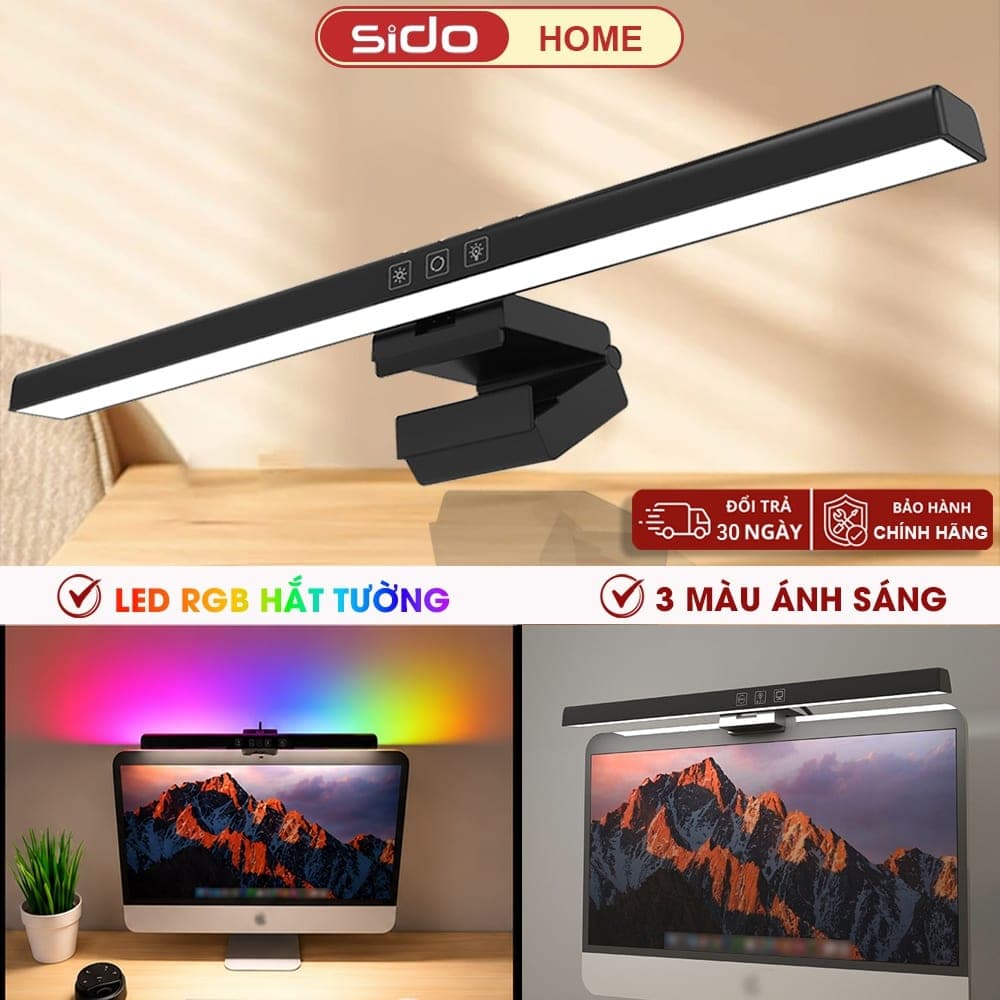
The Sidohome SG301 is an LED bar that rests on the top edge of your monitor and shines light onto the keyboard and desk in front of it. It sits in the budget end of monitor light bars: about 230–280K VND on Shopee, a fraction of what big-brand models cost. What sets the SG301 apart is a version with an RGB LED strip on the back that washes colored light onto the wall behind the monitor. Sidohome is a household and study-lamp brand that sells mainly on e-commerce marketplaces, so most product information comes from its store listing and promotional images.
2Anti-glare lighting and light quality
Like other monitor light bars, the SG301 uses asymmetric lighting (which Sidohome calls “anti-glare light”): light is angled down onto the desk instead of straight ahead, limiting bright reflections on the screen. It offers 3 fixed color temperatures — 3000K (warm, comfortable late at night), 4200K (neutral, good for reading) and 6500K (cool, helps you stay alert) — plus stepless dimming by holding the button. On color rendering, the product description says Ra > 85 while the promo images say Ra > 95. Since those numbers differ quite a bit, expect Ra > 85: good enough for reading, typing and studying, but not a pick for color-accurate drawing or photo editing.
3RGB backlight: a highlight for gaming setups
On the RGB variant, the back of the bar has a colored LED strip that lights up the wall behind the monitor. According to Sidohome's instructions, pressing the RGB button cycles through 7 colors (red, dark green, dark blue, light blue, pink, light green, orange), then an automatic color-cycling mode, then off. Besides looking good, bias lighting behind the screen reduces the contrast between a bright monitor and a dark wall when gaming at night. Note that RGB is only on its own variant, and the effect depends on your wall — white or light-colored walls show it best. There's no software or color sync with other RGB devices.
4Touch controls and timer
The bar has 4 touch buttons. The main button turns the light on and cycles white → warm → neutral → off; hold it to adjust brightness in any color. The second is a timer: the light switches off automatically after 60 minutes, handy if you tend to fall asleep while studying or working late. The third instantly turns on neutral light at maximum brightness, and the fourth controls the RGB backlight. It's a fairly complete feature set for the price, though there's no remote control or automatic light sensor like premium models.
5Installation and power
The light hangs on the monitor using a folding clamp, which Sidohome says fits many types of monitors, including thin-bezel ones. Power comes in through a USB Type-C port on the bar; plug the other end into your monitor's USB port, your PC or a 5V charger. Sidohome doesn't publish the bar length, power draw or maximum monitor thickness, so if your monitor is very thick, strongly curved or ultrawide, ask the seller before buying. Sidohome also has a separate SF301 model for curved monitors.
6Who should buy it — and who shouldn't?
Buy it if you're a student or setting up your first desk and want a decent monitor light under 300K VND, or if you game and want cheap RGB bias lighting behind your monitor. Skip it if you need light with high, clearly specified color rendering for drawing, design or photo editing; want transparent specs and warranty from a big brand; or use a clip-on webcam on top of your monitor with nowhere else to put it. In those cases, consider mid-range models with published CRI > 95 and aluminum bodies, at 2–3 times the price.
7Where this review's information comes from
Zero Technology has not used this product hands-on. This review compiles and analyzes the product description, user instructions and promotional images published by Sidohome in its Shopee store, along with price and sales data from the price-comparison site BigBuy360, as of October 2026. Images in this article are Sidohome's promotional images. Scores reflect features and price relative to similar options, not measurements. Prices and specs may vary by variant and over time — check the product page before ordering.
8Should you buy the Sidohome SG301?
The Sidohome SG301 is good value under 300K VND: anti-glare lighting, 3 color temperatures, stepless dimming, an auto-off timer and an optional RGB backlight — features that are rare at this price. In exchange, the specs aren't transparent, the color rendering figure is inconsistent and the body is plastic. If you want a light that's good enough for studying, evening work or adding atmosphere to a gaming setup, it's a sensible choice; if you need high-quality light for color work, invest in a pricier model.
✓Pros
- Very low price (about 230–280K VND) — much cheaper than big-brand monitor light bars.
- Anti-glare lighting: light falls on the keyboard and desk, limiting reflections on the screen.
- Covers the basics: 3 color temperatures, stepless dimming, a max-brightness button and a 60-minute auto-off timer.
- The RGB version adds a 7-color or auto color-cycling backlight for gaming setups.
- Powered via Type-C from your monitor or PC's USB port, no extra wall socket needed.
- High sales and review counts on Shopee (over 11K sold and over 2K ratings according to a price-comparison site).
✕Cons
- Unclear specs: no published power draw, luminous flux, bar length or supported monitor thickness.
- Inconsistent color rendering figures (Ra > 85 in the description, Ra > 95 in images) — treat the lower one as realistic.
- Only 3 fixed color temperatures, not continuously adjustable like mid-range lights.
- ABS plastic body doesn't feel as premium as aluminum lights.
- Sidohome is a small brand selling mainly on marketplaces; warranty depends on the shop's policy.
- It takes the spot where a clip-on webcam usually goes.
Frequently Asked Questions
Should I get the standard or the RGB version?
Choose the RGB version if you want bias lighting behind your monitor for gaming or decoration. If you only need desk lighting, the standard version is enough and usually cheaper.
Does it cause glare or reflections on the screen?
It limits them thanks to anti-glare lighting that angles light down onto the desk. With a glossy screen, tilt the light slightly downward to avoid bright streaks.
Does it work with curved monitors?
Sidohome says the clamp fits many monitor types but doesn't publish a curvature limit. For strongly curved monitors, ask the seller or consider the Sidohome SF301, designed for curved screens.
How is it powered?
The bar has a USB Type-C port; plug it into your monitor's USB port, your PC or a 5V charger. No wall socket needed.
Does it have an auto-off timer?
Yes. With the light on, press the timer button and it will switch off automatically after 60 minutes.
What is its color rendering index?
The product description says Ra > 85, while the promo images say Ra > 95. Since they disagree, treat Ra > 85 as realistic — fine for reading and work, not for color-accurate tasks.
Verdict
A monitor light bar under 300K VND with anti-glare lighting, 3 color temperatures, a timer and an optional RGB backlight — good value for studying and gaming setups, though its specs aren't transparent.
Worth buying for students and budget gaming setups; people doing color-critical work should choose a higher-end model.Compare Products
How it stacks up against other Workspace we have reviewed, scored on the same criteria.
| Product | Score | Design | Performance | Durability & warranty | Value | |
|---|---|---|---|---|---|---|
Sidohome SG301: An RGB Monitor Light Under 300K VND for Your SetupThis product | 8.1 | 8 | 7.8 | 7.5 | 9 | |
| 8.3 | 8.8 | 8 | 7.8 | 8.6 | ||
| 9.1 | 9.2 | 9.5 | 8.8 | 9 |
Comments
More in Workspace
Desk Pegboard: A Simple Way to Keep Your Workspace Tidy
A desk-clamp pegboard is the quickest way to use the empty space behind your monitor: hang headphones, hold pens and display plants without drilling into the wall. Is this best-selling decor pegboard worth adding to your setup?

North Bayou F80: Upgrade Your Workspace with a Budget Monitor Arm
The North Bayou F80 and its equivalent versions — EZ90, EMA7304 and Warrior WA-MH0801 — are an ergonomic way to make better use of your desk, supporting 17 to 32-inch monitors with flexible gas-spring adjustment.